Recent Posts

Pages: [1] 2 3 ... 10
1
Social Media / Meta to pay up to $18bn to settle claims its platforms harm children
« Last post by riso on August 27, 2026, 11:24:35 AM »
Social media giant Meta has agreed to a $18bn settlement with US states and territories to resolve claims that Facebook and Instagram harmed children.

A California judge approved the settlement, which Meta must pay to 48 states, plus the District of Columbia and three US territories, marking the company's largest payment over child safety litigation to date.

Meta will also implement a host of changes aimed at better protecting kids online, which the states had demanded, including default daily time limits and night-time blocks.

"This is a major moment to clean up an industry that has been hurting our kids," California Attorney General Rob Bonta said.

Meta has denied any wrongdoing as part of the settlement and said on Wednesday that the payment it agreed to "will be distributed in annual instalments over a 10-year period".

Judge Yvonne Gonzalez Rogers approved the settlement, writing that it "reflects a fair, reasonable, comprehensive, and good faith approach not only to provide monetary relief, but importantly, to change conduct in a way that attempts to meaningfully address the negative impacts of the social media platforms at issue".

Meta's $18bn settlement may hasten reckoning for social media on child safety

While the settlement includes almost the entire US, the initial lawsuit was filed in 2023 by 29 states accusing the company of numerous violations of federal and state child privacy laws.

One of the states that was not part of the settlement was New Mexico.

Last month, a federal judge there handed down a historic ruling against Meta, finding it to be a "public nuisance" on par with air pollution and ordering it to pay combined fines of almost $1bn.

Reuters The blue Meta logo, which looks like an infinity sign, outside Meta's HQReuters
As a jury trial kicked off last week in an Oakland, California, federal court, state lawyers argued the tech company knew that millions of 11- and 12-year-old users were on Instagram and Facebook over the years, yet "did little to keep them off" the platforms.

Although the trial had only gone on for five days, state lawyers relied heavily on information found in millions of internal Meta documents provided in the case. They included internal research, employee emails, and chat logs that went all the way up to chief executive Mark Zuckerberg.

One piece of internal research on Instagram stated: "Teens have an addict's narrative about use." Still, the states argued, Meta targeted young users.

"The trial did not go well for Meta," Bonta said on Wednesday.

Meta maintained throughout the brief trial that it had worked extensively over the years to make its platforms safer for its youngest users, pouring resources into testing and research, and building new features.

"We're always working on teen safety," head of Instagram Adam Mosseri said during an hour of court testimony on Tuesday.

The case was settled and court adjourned before he could reappear before a jury.

Before Mosseri's testimony, a former researcher at Meta, George Volichenko, appeared and with lawyers went over various internal communications he had been a part of regarding Meta's work on safety.

Volichenko said he struggled to understand when he was at the company in 2022 why the team he worked on wasn't given more freedom to better test and implement new safety features.

One of those was "quiet mode", which muted notifications for teen users during the night. His team knew such a feature would be much more widely adopted if Meta turned it on by default.

He recalled his manager telling him he "shouldn't worry too much about the adoption figures being low, because the team exists partially to protect the company against the upcoming lawsuits".

As part of the Wednesday settlement, however, a feature called "night mode", which blocks notifications between midnight and 6am, will now be on by default - meaning they will be turned on automatically. The settings are also designed only to be turned off by a parent or guardian.

"The framework we've negotiated will empower parents to easily manage how their children access our platforms," CJ Mahoney, Meta's chief legal officer, said.

Other features for teen users being implemented as part of the deal include:

A default two-hour daily time limit (cumulative across Instagram and Facebook) that teens can only turn off with a parent's permission.
Likes will be hidden, on teens' profiles and those that they interact with.
"School mode", or a mute on notifications between 08:00 and 15:00 during school days.
Prompts noting when a teen has hit 15 minutes of continual use. Then notifications when cumulative use has hit 60 and 90 minutes.
The ability to choose a feed that is not driven by an algorithm.
The ability to turn off autoplay for videos and content.
Extreme make-up filters will no longer be accessible.
As for the new daily time limit for teen users, that will be reduced to one hour of total daily use should other social media platforms like TikTok, Snap and YouTube also agree to implement new restrictions for young users.

Bonta urged such platforms to do so, saying the settlement with Meta "is a good blueprint" for other companies to follow.

Should they not, he suggested on Wednesday that his office would now be "more focused" on bringing changes to the entire social media industry.

Meta also said TikTok and YouTube should implement the same safety features for their younger users.

"Our new Time Limit commitments, Night Mode features and usage limits during school hours set the right path forward for our whole industry, but this framework will only work if all our peers join us," Meta's Mahoney said.

YouTube and TikTok have been contacted for comment.

District of Columbia Attorney General Brian Schwalb called the Meta deal a "monumental public health victory".

He added: "The safety features Meta is required to install will fundamentally and immediately change how young people use Instagram and Facebook."
Via bbc uk Pic via Google
2
Researchers from the University of Birmingham and Durham University have disclosed a serious hardware-based attack that could allow attackers to bypass key Windows 11 security protections without physically accessing the targeted computer. The researchers presented their findings at the 2026 USENIX Security Symposium, showing how weaknesses in the configuration memory of certain consumer RAM modules can be abused to undermine security mechanisms relied upon by Windows.
The technique, dubbed “Download More RAM,” exploits inadequate write protection on a configuration chip found in some DIMMs, or Dual In-line Memory Modules. This chip stores information that tells a computer how much memory is installed. On affected modules, the configuration can potentially be modified through software because the chip is not sufficiently protected against unauthorized writes.

Altering RAM Configuration Creates Memory Aliases
According to the researchers, modifying the configuration can make a system believe that it has significantly more memory than it physically contains. This can expose additional memory addresses that act as aliases for genuine memory locations.

Through these memory aliases, an attacker may gain access to memory that should normally remain protected by operating system and processor-level security controls.

The researchers demonstrated that the technique could be used to re-enable hundreds of known-vulnerable drivers that had previously been blocked because of their use in malware and ransomware campaigns.

Antivirus and EDR Protections Could Also Be Undermined
The research also demonstrated that memory aliasing can potentially be used to disable antivirus and Endpoint Detection and Response (EDR) software. These security tools continuously monitor systems for suspicious activity and help detect or block cyberattacks.

The researchers further showed that the technique could compromise protections associated with Microsoft’s Virtualization-based Security (VBS), including access to memory enclaves designed to isolate sensitive information.

The attack can also undermine Hypervisor-Enforced Code Integrity (HVCI), a security technology intended to protect Windows against threats even when an attacker has administrator-level privileges.

One-Click Attack Chain Demonstrated
The research team reportedly developed a one-click script capable of automating several stages of the attack, including memory aliasing, rebooting the system and disabling antivirus protections. According to the researchers, the process does not require user interaction, raising concerns about the possibility of automated and large-scale exploitation.

The researchers surveyed popular consumer DDR4 and DDR5 memory modules and found that at least one product line from Corsair, G.Skill and ADATA had configuration chips without complete write protection.

The study estimated that these three manufacturers collectively account for about 55% of the high-performance consumer memory market and more than 70% of the gaming segment.

By contrast, modules from Crucial, Kingston and HyperX, along with some G.Skill product lines, were found to use partial write protection that was sufficient to prevent the demonstrated attack.

Microsoft Assigned CVE-2026-23670
The researchers followed coordinated disclosure procedures and informed affected vendors before making their findings public. Microsoft acknowledged the vulnerability, assigned it CVE-2026-23670 and released mitigations through its April 2026 security updates.

Windows systems with Secure Boot enabled are currently protected against the demonstrated form of the attack. Systems running without Secure Boot, however, may remain vulnerable.

The researchers have therefore advised users and organizations to verify that Secure Boot is enabled and to apply the relevant Microsoft security updates.

Memory Vendors Also Introduce Mitigations
Corsair has added functionality to its iCUE software that allows users to enable write protection on compatible memory modules after installation, providing a hardware-level mitigation.

The HWiNFO utility has also incorporated similar functionality for compatible modules from other manufacturers. In addition, some motherboard manufacturers provide BIOS settings that can block write operations to memory configuration chips, offering another mitigation option.

A University of Birmingham researcher warned that strong operating system security ultimately depends on the integrity of lower-level system components. If an attacker can compromise a lower layer, protections implemented above it may also be put at risk.

The findings highlight that protecting Windows systems requires more than software updates and antivirus tools alone. Organizations using potentially affected hardware should verify Secure Boot status, install Microsoft’s security updates and enable hardware-level write protection where supported.
Via 420.in @ Pic via Google
3
Windows 12 (or whatever the next version of Windows is called) will probably arrive someday, but not any time soon. Microsoft didn't say anything publicly about it at Build or CES, and when I recently spoke with some executives involved in Windows development, they told me the company has no plans to release Windows 12 this year.

That said, the representatives did discuss some plans for the future of the world’s most popular desktop operating system, so I have a pretty good idea of what to expect from Windows 11's eventual successor. Below are predictions you can count on.

1. Don't Expect Windows 12 Before 2027
Six years passed between the launch of Windows 10 and Windows 11 in October 2021, so we’re technically due for a new version of Windows in 2027. If that's the actual plan, Microsoft would likely announce it in the summer of 2027. However, this doesn't seem likely to me. Microsoft is still dealing with the mess it created by stranding many existing PCs on Windows 10, and the company is in no hurry to repeat that mistake by launching yet another edition.

Sources tell me that Microsoft employees are debating the value of naming a new version of their operating system Windows 12 versus continuing to improve Windows 11. (The latter continues to get major updates annually in the fall.) I've also learned that the support life cycle is a major consideration: If Microsoft releases Windows 12, it could trigger an end-of-life timer for Windows 11. Companies would have to upgrade or lose security updates, and Microsoft would be dealing with another Windows 10-style mess. Thus, Microsoft seems motivated to improve the Windows 11 experience in the near term.

2. Windows 12 Won't Require a Subscription
Rumors that Windows will one day require a subscription have persisted for years. There’s no evidence Microsoft will require a subscription to use Windows 12. In fact, the company is moving in the opposite direction: After previously announcing that Windows 10 users would have to pay to continue receiving security updates after the operating system reached the end of mainstream support in October 2025, it repeatedly waived this requirement and continued to offer years of free security updates. Microsoft clearly doesn’t want to tell home users they need a subscription to continue using their PCs (even if businesses must).
Yes, the words “subscription edition” and “subscription status” appeared in Windows builds in 2023, but these were likely in reference to business-focused editions, such as Windows 365 (a cloud-hosted Windows desktop that runs on Microsoft’s servers) or subscription-based licensing for businesses. Many companies have volume licensing contracts with Microsoft that are essentially subscriptions for the operating system and security updates.

A subscription requirement would be disastrous, as no other desktop operating system requires one. It would be a massive mistake to go this route, when Windows faces competition from Apple’s macOS and the forthcoming Googlebooks to desktop Linux, SteamOS gaming systems, and existing versions of Windows that don’t require a subscription. Still, Windows 12 may get deeper integrations with Microsoft’s other subscription services. To that end, Windows 11 already shows your Microsoft 365 subscription status in the Settings app and encourages you to upgrade for more OneDrive storage. Windows 12 might introduce more powerful AI features that require a Copilot subscription, but it will almost certainly be optional.

3. Most Windows 11 PCs Should Run Windows 12
If Microsoft does release Windows 12 in the next few years, it likely won’t bump the operating system’s hardware requirements. As mentioned, Windows 11’s stringent hardware requirements have resulted in a large number of ineligible Windows 10 PCs that the company feels obligated to continue supporting.

Microsoft is also de-emphasizing its Copilot+ PC branding. Copilot+ PCs include AI features such as Click To Do and Recall, and require a computer with a neural processing unit (NPU). The company is expanding AI efforts beyond those machines, activating AI features on PCs with Nvidia GPUs and debuting Aion small language models that can run on CPUs at Build.

Windows 12 probably won’t require more than 8GB of RAM, either. After pushing for 16GB of RAM as the minimum for Copilot+ PCs, Microsoft is now making Windows more efficient to address the RAM crisis and better compete with Apple’s MacBook Pro. Microsoft recently released new Surface devices with only 8GB of RAM. It has also said that it will continue offering versions of Windows on both Arm and x86 hardware, unlike Apple, which ended support for Intel-powered x86 Macs after macOS Tahoe.

4. Agentic AI Will Define Windows 12
Microsoft has been clear that agentic AI is the future of Windows and computing in general, showing off AI agents at Build. If it does release a splashy new Windows 12 operating system, it will almost certainly focus on agentic AI features that can use your apps for you and carry out tasks independently.

Microsoft is already working on agentic AI features that run on Windows 11; the company doesn’t want to limit them to only a handful of devices. Instead, it thinks “every Windows 11 PC is an AI PC.” I expect the vast majority of Microsoft’s latest AI features to roll out to all Windows 11 PCs rather than in a future version of the OS.

Additionally, Microsoft already created a new AI-first operating system experience called Project Solara, which it debuted at Build. Rather than a Windows 8-style approach of replacing the traditional desktop with something entirely new, Microsoft is keeping its experimental AI-first interface off of Windows for now. Microsoft’s Project Aion interface from 2024 appears to have been an experimental project, and I don't expect it to be a blueprint for Windows 12.

5. Windows 12 Will Feel More Familiar Than New
Microsoft’s Windows team isn’t acting like it’s about to unveil a completely new interface, as it did with Windows 8, Windows 10, and Windows 11. Instead, developers have been polishing the Windows 11 desktop. Microsoft is working on restoring features to the taskbar and speeding up File Explorer, for example. Recent changes in Windows Insider builds focus on modernizing the interface, replacing older Windows 8-style dialogues with Windows 11-style ones, and porting options from the Control Panel to the Settings app.

Additionally, Microsoft is committing to its current application platform. At Build, the company announced that its WinUI 3 application framework for developers would now be called WinUI without the version number. Microsoft’s Chris Anderson, vice president of software engineering, said the company has no plans to make a massive shift and wants to deliver a stable application platform for developers.

Based on Microsoft’s actions, a new version of Windows with a fresh application platform and redesigned desktop is almost certainly not just around the corner. Thus, if Microsoft does launch something branded “Windows 12,” it is likely to feel like an update to Windows 11 with more agentic AI features rather than an overhaul. In other words, Windows 12 might turn out to be more of a marketing effort than a transformative shift.

6. Watch the Windows Insider Program for Early Clues
Microsoft is developing much of Windows in public. The revamped Windows Insider program has a variety of channels, including an Experimental (Future Platforms) one. Microsoft says these builds “represent platform changes early in the development cycle.” Major changes in these experimental builds might give us an idea of what to expect when a new version of Windows is on the way.

After the company polishes Windows 11 with the 26H2 release in the fall of 2026, perhaps it will shift to more future-looking changes to Windows 11 that might ultimately be the foundation of Windows 12 rather than a prospective 27H2 Update.
Via pcmag.com / Pic: (Credit: Zain bin Awais; Microsoft)
4
General Discussion / The pros and cons of managed VPS hosting
« Last post by riso on August 26, 2026, 10:31:47 AM »
Shared hosting can only go so far. Complex web apps, automated workflows, and AI stacks that combine tools like n8n and OpenClaw will hit resource limits quickly. So you're left to choose between VPS providers, which give you the option to go for managed or unmanaged options.

It feels like a simple enough trade-off. Pay more if you want direct access to the provider's support team to troubleshoot and maintain your setup. Pay less if you think you can handle everything yourself. But the reality is much more complicated.

VPS providers each have a different definition of what constitutes a "managed" service. Some of them will actively work with you to install your applications, set up workflows, and perform ongoing maintenance and troubleshooting as needed. Others will offer the same level of support as an unmanaged VPS plan, but with improved availability throughout the day.

Here's how I advise my colleagues and friends to choose between managed and unmanaged VPS, situation by situation. Read till the end for a clear understanding of what constitutes a proper managed service, where the trade-offs are, and what to check for in the fine print.

What is managed VPS hosting? How is it different from other hosting solutions?
A Virtual Private Server (VPS) is a digitally walled-off section of a physical server with its own allotment of CPU cores, RAM, storage space, and GPU power. Unlike shared hosting, it doesn't scale your resources up or down during busy hours, which leads to better performance and reduced downtime concerns.

Of course, we're talking about managed VPS, which is a bit different from the usual setup. Your hosting provider pretty much takes over the day-to-day maintenance of your server and applications, so you can just focus on running the tools to get the intended results, instead of getting stuck in configuration woes.

The flip side of this is that many VPS providers will not give you root access to your server if you opt for a managed plan, which takes away your ability to build really custom solutions. That is unless your hosting provider is technically proficient enough. Managed hosting is not always like-for-like, because there's no industry-standard criteria for the level of management or support a host needs to offer. For example, they could literally help you set up a containerized Docker instance with n8n or OpenClaw step by step, or they could just give you access to more support channels but leave you on your own when it comes to apps and setup.

The pros and cons of managed VPS hosting
Pros

Cons

Dedicated hardware resources

Higher monthly cost

Expert support and monitoring

Less granular control

Faster incident response

Potential vendor lock-in
Less time on server admin

Slower to make custom changes

Easier compliance and security upkeep

Still requires some technical oversight

Pros
Dedicated resources: VPS hosting services set aside an agreed-upon amount of CPU, RAM, and storage space for you and you alone. This is essential for AI apps, databases, and automated workflows that rely on powerful hardware.

Expert support: If you're switching to VPS hosting from a shared server plan, you may not be prepared to deal with the complexity of managing a VPS server with a command-line interface. Installing an operating system, setting up firewalls, and adding security patches on top of configuring the apps and services necessary for your workflows can be a lot. Most managed VPS plans come with 24/7 technical support to address this issue.

Faster incident response: What happens when your server goes down? Troubleshooting can take hours, if not days, without the requisite training to navigate server-level issues. Your hosting provider's support team can help you get your server back online faster, a promise which is often legally backed by a Service-Level Agreement (SLA).

Outsourced admin: VPS providers give you direct access to IT experts who can handle all your server's day-to-day admin tasks, like keeping your operating system, firewalls, applications, and databases all patched up. Even the cheaper managed plans have automated tools and workflows to minimize your admin time, which is useful for smaller teams and solo business owners.

Easier compliance: Complying with regional and industry-specific data protection regulations like the GDPR, CCPA, HIPAA, or GLBA can be an ongoing challenge unless you have dedicated legal and technical support built into your team. Managed hosting providers take away a lot of this legwork by offering advice and tooling to improve and maintain your compliance posture.

Cons
Higher monthly cost: VPS servers can be expensive as-is, but a managed server plan typically comes with a premium on top of your base plan that can add to your ongoing costs. A basic self-managed VPS server can be rented for as low as $10-$20 per month, whereas managed plans normally range from $40-$120.

Limited control: Managed hosting providers may not offer you root access to your VPS server, since they assume you want them to take care of server administration themselves. It also helps limit the number of issues their support team has to troubleshoot, but limits your level of access for extensive reconfiguration.

Vendor lock-in concerns: Even when hosting providers are generous with cancellation requests, the use of proprietary software to manage and maintain your server makes it harder to migrate to a different platform that won't have access to the same tools. Sometimes, it may even mean configuring all your services and workflows from scratch.

Slower customization: Anything that isn't part of your starter toolkit has to go through a support ticket to be implemented, which means custom workflows and applications can take weeks to build and launch since you don't have root access yourself.

Oversight: While a managed plan takes a lot of hassle off your plate, many VPS providers don't offer enough to fully replace having your own IT experts if your organization exceeds a certain size. Granular application-level changes and workflow customization, depending on the level of support offered by your provider, might still fall to you.

What level of support can I expect from a managed VPS?
Support level fluctuates widely among managed VPS providers, so it's worth being clear on exactly what is included before you sign up for a long-term subscription.

At the minimum, make sure your VPS provider includes 24/7 technical support and look for an SLA-backed uptime guarantee of at least 99.9%. Check to see which support channels are available; whether there's a phone hotline or online contact options like live chat and ticketing only. Finally, look for standard inclusions like OS security patching, automated backups, DDoS protection, etc.

Another trick that I personally like to use is going through the provider's customer reviews. Go beyond the aggregated rating and see what the reviews are actually saying, what the weakest links are, and whether they will be a problem for you.

When it comes to the SLA, you shouldn't rely on the uptime percentage alone, which is often generalized. Review the actual terms of the SLA contract and see if they offer actual uptime figures from the last 3-5 years. Also, check what kind of compensation you can expect if an SLA guarantee isn't upheld. Most decent VPS hosts offer free usage credits to your account as compensation, while the best ones also back it with financial compensation if uptime falls below a certain threshold.
Via yahootech pic via Google
5
Microsoft’s next Patch Tuesday, launching on September 8, 2026, focuses on letting users customize their experience, with new options to move the Taskbar, resize the Start menu, and remove unwanted Search suggestions. If your PC has the update, you can find these new customization features in Settings, under Personalization and Taskbar, so it’s easy to try them out for yourself.

The main focus is the Start menu
I can’t believe it’s taken Microsoft this long to let us control how our Start menu behaves
While some users may have found the app suggestions and recommendations helpful for discovering new tools or features, many of us have had to deal with a Start menu filled with unwanted suggestions and algorithmically generated recommendations for years, and it’s just so messy and convoluted to use nowadays, at least in my opinion.

The September update includes dedicated toggle switches in the Personalization settings that let people switch off any sections they don't want. For example, go to Settings > Personalization, then select Start to see the new toggles—just turn one off to instantly remove suggestions or sections you don't want.

With this first Patch Tuesday update, users can choose whether the recent items section includes newly installed apps, recent files, or tips, and adjust the menu's overall size by selecting a small or large option. Even better, there’s a new toggle that lets you hide your username and picture from the interface, making it look much cleaner and more streamlined.

What else is coming in September’s Patch Tuesday?
Along with the redesign of the Start menu, users can now also move the Taskbar. Instead of being fixed in the default position at the bottom, as it was when Windows 11 first launched, users can go to the Taskbar settings menu and move the bar to the top of the screen. The ability to change the position is accompanied by a new option to adjust the size, which allows the Taskbar and its associated icons to be shrunk, freeing up valuable vertical screen space.

Windows Search is also getting a major feature overhaul, prioritizing local files and installed applications over web content. Users can now switch off web search results so that the Bing integration will not fill in local searches, and turn off suggestions for Microsoft Store apps, which often overwhelm the search home screen. This is combined with a simplified search home user interface that makes it easier to access recent searches and shows clearly whether a particular result is a local file, a system setting, or an application.

Remember, Microsoft is expected to begin rolling out these features gradually, starting with the September update, so you might not have them on your device right away. To check if the update is available for your PC, go to Settings, select Windows Update, and then click Check for updates. This will let you see if the new features have been installed on your device. Keep checking back regularly if you do not see them right away.
Source makeuseoff.com
6
Microsoft / Microsoft to Hold .NET Conf 2026 November 10-12
« Last post by riso on August 26, 2026, 09:56:15 AM »
As usual, Microsoft will hold its virtual .NET Conf in November this year, where it will launch .NET 11.
Hey .NET Fans! It’s that time of year again: .NET Conf is back November 10-12, 2026.

We’ll spend three days learning from the people who build and use .NET, catching up with the community, and launching .NET 11. The event is free and online, so mark your calendar and join us from wherever you are.

Get ready for the release of .NET 11
We’ve been busy building .NET 11, and there’s already plenty to try. The latest previews include work across the runtime, libraries, SDK, ASP.NET Core, C#, .NET MAUI, Entity Framework Core, and more. We’re especially excited about C# 15 union types and the move to CoreCLR for .NET MAUI apps on Android, iOS, and Mac Catalyst. ASP.NET Core and Blazor also have a lot in store, including richer static SSR and form validation, smaller Blazor WebAssembly apps, a new development server, and smoother Aspire integration. Minimal APIs gain async validation and C# union type support, and OpenAPI 3.2 is now the default. Alongside the .NET 11 work, we’ve also released v2.0 of the official MCP C# SDK, with a stateless-by-default protocol designed to make building and scaling AI tools with ASP.NET Core more straightforward.

Catch up on what we’ve shared so far:

Explore what’s new in .NET 11
Explore what’s new in ASP.NET Core in .NET 11
Explore union types in C# 15
Follow the latest CoreCLR progress for .NET MAUI
Read about v2.0 of the official MCP C# SDK
You can also hear directly from the teams in recent .NET Community Standups. There’s more on the way between now and November. We think you’re going to love what the teams have been working on, and we can’t wait to show you the rest at .NET Conf.

Schedule coming soon
We’re hard at work putting the product team schedule together. When the conference site and session list go live, we’ll publish those sessions on our new http://dot.net/conf mini-site and on the community-run http://dotnetconf.net site. I’m looking forward to it as always.
riso@techsupport via devblogs.microsoft.com/dotnet/dotnet-conf-2026/
7


Security teams have spent years hardening authentication, with controls like multi-factor authentication (MFA) and conditional access now commonplace. While stronger authentication can make traditional credential theft less effective, it doesn’t solve every identity problem.

There are several points in the identity lifecycle where trust is established or re-established:

   ■ When a new employee joins.

   ■ When someone loses access to their account.

   ■ When a password or MFA factor needs to be reset.

   ■ When the service desk is asked to make a sensitive change to an account.

Rather than stealing credentials or bypassing MFA, an attacker can instead try to convince the service desk that they are the account holder, using social engineering to exploit legitimate processes.

That puts greater pressure on organizations to secure both the login as well as the processes around account creation and recovery.

How Attackers Exploit Identity at Onboarding and Recovery

In late July 2026, the US Department of State and allies including Japan, Canada and the UK issued a joint alert warning that North Korean IT workers were impersonating foreign nationals to secure employment.

Their tactics focus on falsifying identity documents, such as using images supplied by a third party based in another country to register accounts. The North Korean then carries out the actual work.

These workers typically target technology companies, so the important point is not that every organization should expect the same type of campaign. It is that onboarding creates a moment when trust is established for the first time.

If identity checks fail at that stage, the attacker can enter the environment with access that appears legitimate.

The same issue can occur during the recovery process. Threat actor groups like Scattered Spider are proficient at social engineering, impersonating employees and calling the service desk to reset passwords that gift access to an account.

This tactic was linked to the 2025 M&S ransomware breach, which contributed to an estimated $400 million hit to the retailer’s operating profit through lost sales.

The security question in these scenarios is the same: how confidently can the organization verify that the person making the request is who they claim to be?

Strong Authentication Still Depends on Strong Identity Checks

When someone calls the service desk claiming that they’ve forgotten their password or lost access to their authenticator, the agent needs to be able to confidently verify the person calling is the real account owner.

However, in many organizations identity checks can still rely on relatively weak signals. A service desk might ask for an employee ID or phone number. Security questions are still common, asking the caller the name of their first pet or where they went to school.

The problem is that many of these checks can be researched, stolen or manipulated. Attackers can find personal information through data breaches or social media.

Even in instances where stronger checks are in place, the North Korean remote worker campaigns demonstrate how documents and other identity evidence can be altered or fabricated.

AI is making impersonation more convincing, too. Attackers can use synthetic profiles, manipulated images, cloned voices and deepfake video to support a false identity or make a social engineering attempt more believable.

All of these make it harder for agents to act with confidence. As it’s vital for organizations to verify users during onboarding and recovery events, they need stronger measures to deliver that verification.

Strengthen Verification During High-Risk Identity Events

Solutions like Specops Verified ID add another layer of assurance and helps service desk agents confidently confirm identity before sensitive actions take place.

It does this by combining government document scanning and validation with biometric liveness detection.

Document checks help confirm that the ID being presented is legitimate, while liveness detection helps verify that a real, present person is completing the process rather than relying on a static image or other replayed evidence.

During onboarding, this gives organizations a stronger way to verify new employees before granting access to corporate systems. That can reduce the risk posed by fraudulent applicants and impersonation attempts, including tactics seen in North Korean remote worker campaigns.

The same approach can be applied when high-assurance verification is needed, such as password resets for privileged accounts.

Rather than adding complexity to every identity event, Specops Verified ID applies stronger verification where the consequences of getting it wrong are highest.

Protect Your Service Desk with Specops

Strong authentication remains essential, but attackers will continue looking for ways around the controls that are hardest to break. Increasingly, that means targeting the processes used to establish or recover identity rather than attacking the login itself.

Whether an organization is onboarding a new employee or helping an existing one recover their account, the challenge is ensuring the right person is granted access.

Specops Verified ID adds government ID validation and biometric liveness detection to these high-risk identity events, helping organizations make that decision with greater confidence.

source
8


A supply-chain attack targeting Android-based car head units is using a legitimate device-update app to spread malware that enlists compromised devices in a proxy botnet or uses them for ad fraud.

Kaspersky researchers analyzed the malware and attributed the operation to the MoYu group, a threat actor previously associated with the BadBox malware botnet.

The researchers note that this is the first documented case of a malware infection chain specifically created for the targeted car head unit.

MoYu's operation targets systems from DoFun, a Chinese automotive software and hardware provider owned by Shenzhen Driving Control Technology Co., Ltd.

DoFun is an automotive software, cloud services, and hardware provider that sells generic Android-based head units, which act as the command center for a car's infotainment, navigation, and settings systems.

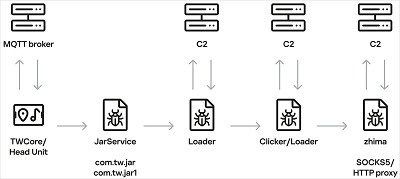
In June, Kaspersky researchers found a rogue APK file being downloaded from a legitimate DoFun system app, TWCore, which receives instructions through an MQTT server hosted at cardoor[.]cn.

The unknown app has no interface and is a piece of malware called JarService. When launched, the malware decrypts and executes a second-stage loader that establishes communication with a command-and-control (C2) server and downloads another encrypted payload.

The final payload periodically reports device information such as the model, display resolution, Wi-Fi SSID, and MAC address, and retrieves commands from the attackers.

The malware supports the following nine commands:

   1. return - Retrieves a specified value from Android’s SharedPreferences storage

   2. copy - Copies stored or downloaded content to the device clipboard

   3. http - Sends HTTP GET or POST requests and can save part of the response

   4. web - Opens a URL in a WebView and executes supplied JavaScript

   5. loadlib - Not fully implemented when Kaspersky published the report

   6. loadlib2 - Downloads and executes arbitrary code or additional modules

   7. loadlib3 - Not fully implemented when Kaspersky published the report

   8. deeplink - Opens a specified resource in the browser

   9. traceroute - Checks whether specified hosts are reachable using ICMP ping

Kaspersky says the malware does not interfere with driving or critical vehicle control systems, and appears designed for advertising fraud and turning internet-connected car head units into residential proxy nodes for monetization purposes.


The head unit infection scheme | Source: Kaspersky

Researchers discovered that the operator primarily loaded a reverse-proxy module named ‘zhima,’ which turns the head unit into a proxy botnet node, and also made web requests for click-fraud activity.

Kaspersky says it notified DoFun of its findings, and the Chinese firm replied that it resolved the problem.

BleepingComputer has contacted both companies with questions about the initial compromise vector, and we will update the article with the information once received.

source
9
Windows 11 will silently remove GPU drivers after prolonged Eco Mode use, requiring manual driver reinstallation.

The tech enthusiast community is certainly a great place to be for nerds. Here, users can learn and discover all sorts of interesting things, both for software and hardware. For example, earlier today we covered the tale someone who came to know of CompactOS, an official Windows feature that helps save disk space. While that was something we already knew, another user, also on Reddit, discovered an entirely new thing that caught many, including us, by surprise.

The affected user found that Windows 11 can quietly delete your graphics driver if your device is kept in "Eco Mode" without any apparent warning. The problem could be limited to the Asus ROG laptops where it took place, or it could be a widespread issue affecting all such systems that feature similar power settings.

As a reminder, Microsoft had been previously known to downgrade Windows graphics drivers, something that's finally being fixed as part of the new Driver Quality Initiative (DQI), this new issue of complete removal of drivers went totally unnoticed.

For those wondering what exactly happened, the user was running a ROG Zephyrus G14 with an RTX 5070 Ti Laptop GPU and had kept the machine in Eco Mode for several weeks. This mode effectively power-gates the discrete GPU, seemingly leading Windows to believe as if the device has been disconnected.

Interestingly, this seems to trigger a Windows maintenance process called pnpclean.dll that can remove devices that have been absent for a certain period. The DLL in question, as the name suggests, is said to handle Plug and Play (PnP) clean-up tasks on Windows, basically maintaining unused device drivers by removing them when they appear to no longer be connected.

According to the user's investigation of the setupapi.dev.log file, his GPU had a 15-day timeout. Once that period passed, Windows removed the device and subsequently removed its unused Nvidia driver package as well. The default timeout is reportedly 30 days.

Consequently, switching back to Standard Mode caused the GPU to reappear as a new device, but without its proper driver. It instead showed up as the Microsoft Basic Display Adapter, with the user also reporting a Code 10 error and Nvidia's software claiming that the installed driver was incompatible.

The discovery may not be limited to Nvidia hardware either. The user believes AMD GPUs could be affected as well if Windows considers them absent for long enough. Other users have also reported seeing similar behavior with older G14 models.

Following this discovery, G-Helper, which is a lightweight control tool for Asus laptops, has added an advisory on how to deal with the situation. It says:

"If your dGPU stays disabled (in Eco mode) for a long time (15 days for Nvidia), Windows decides that device is gone for good and silently removes it together with its driver during automated disk cleanup. Next switch to Standard mode brings GPU back as Microsoft Basic Display Adapter (error 10 or 28 in Device Manager), and only reinstalling the Nvidia driver fixes it."

To prevent this you can turn off that specific cleanup. Run in PowerShell (as admin):

Set-ItemProperty 'HKLM:\SOFTWARE\Microsoft\Windows\CurrentVersion\Explorer\VolumeCaches\Device Driver Packages' -Name Autorun -Value 0

Setting the DWORD value to 0 essentially stops the automatic silent pass. In case you don't want to deal with that, G-Helper has recommended users to periodically switch to Standard mode once in a while to reset the 15-30 day timer.

Source: Ok-Horse-3169 (Reddit) via G-Helper (GitHub)

source
10
And almost called it Freax

It's been 35 years since Finnish graduate student Linus Torvalds drafted a brief note saying he was starting a hobby operating system. The world will never be the same.



   • At the start, Torvalds had no clue how big Linux would become.

   • Some early developers still work on Linux today.

   • Torvalds has no intention of ever stopping work on Linux.

In 1991, Unix was an important but secondary x86 operating system. That year, on Aug. 25, a Finnish graduate student named Linus Benedict Torvalds announced on the Usenet group comp.os.minix that he was working on "a (free) operating system (just a hobby, won't be big and professional like gnu) for 386(486) AT clones."

No one knew it, not even Torvalds, but the technology world was about to change forever.

Thirty-five years later, Linux rules IT. Almost all major websites, including Google, Facebook, and Wikipedia, run on Linux. The same is true of the cloud. Even on Microsoft's Azure, Linux is the most popular operating system. As for supercomputers, the world's fastest 500 supercomputers run Linux. Thanks to Android, Linux is also the most popular end-user operating system.

Not bad for a hobby operating system.

Four birthdays

Torvalds and I have talked about Linux and its history, and he's both pleased and bemused by Linux's rise. But as for the operating system's birthday, Torvalds said, you can argue it has four birthdays:

Quote
"The first newsgroup post is more public (August 25), and you can find it with headers giving date and time and everything. In contrast, I don't think the 0.01 release was ever announced in any public setting (only in private to a few people who had shown interest, and I don't think any of those emails survive). These days the way to find the 0.01 date (September 17) is to go and look at the dates of the files in the tar-file that still remains.

"So, both of them work for me. Or either.

"And, by the way, some people will argue for yet other days. For example, the earliest public semi-mention of Linux was July 3: that was the first time I asked for some POSIX docs publicly on the Minix newsgroup and mentioned I was working on a project (but didn't name it). And at the other end, October 5 was the first time I actually publicly announced a Linux version: "version 0.02 (+1 (very small) patch already)."

In those early days, Torvalds was encouraged by his professors at the University of Helsinki.

Quote
"Most of the time, Linux was very much under the radar -- it's not like it was ever a university project and I didn't want it to be -- but Helsinki University (at least the CS department) was very open to unofficial 'extra-curricular' activities. I don't think Linux was necessarily all that special in that way either. It just happened to grow to be something big. I never got the feeling that you had to work a special way, or that only the sanctioned official university projects were given resources. For example, the CS department ended up trying out (and then using fairly widely) Linux machines running X as thin clients, but also a DEC Alpha machine running Linux in the server room. Sure, Linux use in universities wasn't exactly unusual, but I think they were particularly open to it because it was a local, cool project."

At the time, Torvalds thought he'd call Linux "Freax," a mashup of "free," "freak," and "x" to evoke a Unix‑like system. When he uploaded the code to the FUNET FTP server, though, his friend Ari Lemmke, who set up the first servers, really disliked "Freax," so he named the project directory "Linux" instead, and that name stuck.

Trying out this new thing

The first person to "install" this wet-behind-the-ears operating system was his buddy, Lars Wirzenius.

Wirzenius later recalled: "People were interested in trying out this new thing, so Linus needed to provide an installation method and instructions. Since he only had one PC, he came to visit to install it on mine. Since his computer had been used to develop Linux, which had simply grown on top of his Minix installation, it had never actually been installed before. Thus, mine was the first PC where Linux was ever installed. While this was happening, I was taking a nap, and I recommend this method of installing Linux: napping while Linus does the hard work."

Once 0.02 was available, a small but enthusiastic group of volunteers began downloading, testing, tweaking, and returning patches to Torvalds via email and Usenet. So, from the start, Linux became a collaborative project. The turning point was that Torvalds not only accepted outside changes but actively encouraged them, treating his kernel as a commons that others could extend.

It didn't take long for Torvalds to realize his little project wouldn't stay little for long. By the end of 1991, Linux was gaining more attention than GNU Hurd or Minix (Andrew Tanenbaum's ground-breaking free software educational Unix operating system). Torvalds explained:

Quote
"I started doing some paging to disk around Christmas 1991, and at that point, Linux was doing things that Minix didn't. It was one of the reasons why the release numbering jumped from 0.03 (perhaps November 1991) to 0.12 (January 1992).

"That wasn't exactly radical (people had made Minix extensions that did paging etc), but it was a sign that Linux was starting to do things that I wasn't used to Minix doing.

"By summer 1992, we had X running and Linux just looked like a completely different animal from the Minix I had grown used to (but I don't even know what Minix did afterward).

"The rest happened pretty gradually and never really hit me as being as exceptional as the early 1992 realization that there were actually people I didn't know who were using and tinkering with Linux."

A lot smaller back then

One of the first contributors, and still a Linux maintainer today, was Theodore "Ted" Ts'o. He created the first Linux mirror in North America. Ts'o told me: "I started playing with Linux sometime in September 1991. At the time, there was only a 64Kbps link between Finland and the US. Fortunately, Linux sources were a lot smaller back then -- the sources for Linux 0.11 were only 93K. Still, we had to share this European interconnect with everyone else using the internet at the time, and so download times could suffer."

He continued, "Since MIT was one of the founding members of the New England Academic and Research network (NEARnet), it had multiple princely 10 megabit microwave links to Harvard, Boston University, and to BBN, where it connected to the rest of the internet. (Most universities at the time had only 1.5 megabit T1 lines.) So I set up an FTP server using my VAXstation 3100 on my desk, which was called tsx-11.mit.edu."

That's when I joined the party. I'd been using Unix for over a decade. I'd seen the Usenet posts, and thought I'd give it a try. But I could only try it after Ts'o put up his FTP server. You may have noticed that I rather like Linux.

Torvalds' good friend Dirk Hohndel, head of Ericsson Software Technology, told me recently: "The first presentations about Linux (and XFree86) at a conference happened in the fall of 1993 at NLUUG in Ede, Netherlands. The conference had two tracks. The room for Linus' talk was packed, a real fire hazard with people sitting on the stairs, etc. Just before Linus was to start, the door opened again, and a few more people came in. One of the organizers told them that the room was too full and they should go next door to the other track. One of the people coming in said, 'Well, I'm the other presenter, and these are the people that were in my audience, but we all would rather hear Linus' talk.'"

No idea where it could all lead

The term for what was happening with Linux hadn't been invented yet. Today, we call it open source.

This concept of developers working together on jointly held and managed code became the single most important software development method in history. While Linux would not have existed without Linus, influential early Linux developers such as Theodore Ts'o, James Bottomley, Gerald Pfeifer, and Greg Kroah-Hartman were also vital to its growth.

Of course, they had no idea where it would all lead.

As Torvalds told me, "The '91 model year Linus really didn't think 30 years ahead, and if he had, he wouldn't have thought that the experiment he was working on would be around at all. Other projects seemed much more serious."

Looking back, Torvalds said he usually thinks, "some of the early stuff that really probably isn't all that big a deal anymore, but that felt big to me just because they were surprising and/or important at the time." 

self-hosting for the first time, I think. And 0.12 was when it suddenly became almost useful to some people, and you could actually do some limited real work with it (and when the aforementioned 'Hey, people I don't know are using it' happened). Admittedly, you had to be pretty hardcore to play around with it, but there are still active kernel developers around from that timeframe."

Looking at the bigger picture, Torvalds has said the period in early 1992, when Linux switched to the GNU Public License version 2 (GPLv2), was especially important. He recalled: "It wasn't the original license, but I'm convinced it's a big part of why Linux became so widespread. Not everybody loves the GPL, and I've had my own issues with the FSF [Free Software Foundation], but I do think the GPLv2 has been a huge deal, and people shouldn't dismiss the licensing issues."

He also said:

Quote
"I think the companies getting involved has been hugely important -- and that may sound so obvious as to be trite and stupid, but some corners of the open-source community have been fairly negative to any commercial involvement."

But the commercial interest in Linux has been important:

Quote
"It's a cultural thing, and while it started out small (with various commercial Linux distributions starting out already in 92), it was a fairly continual thing. There were a few big notable events along the way: IBM coming on board, Oracle, the Red Hat IPO, etc, but I think the underlying big thing really is that co-existence between the open-source kernel people and a lot of very different companies. I think that's fairly unusual and unique.

"There have been the purely technical ones. That's been so constant that it's hard to point to anything really particular. I think the first ports to other architectures were perhaps conceptually one of the biggest steps (and particularly the Linux/alpha port) because it changed the whole target landscape.

"Of course, the version control systems (VCS) BitKeeper, and then obviously Git, were both big steps, simply because of how they changed my ability to manage the source code. A few corners of the kernel tree had tried CVS [Concurrent Versions System], but it really wasn't a useful tool for something that distributed. So BK and Git didn't change the kernel directly, but made some of the progress possible indirectly."

Indeed, Torvalds has told me that it was only after he created Git that he felt like a successful programmer. After that, he no longer needed to fear that Linux was a one-off.

Not retiring anytime soon

Five years ago, Torvalds told me he saw himself keeping on: "I'm 51 years young, I enjoy what I'm doing. What would I do if I didn't do Linux? Puttering around in the garden? Not bloody likely. You could ask me again in a couple of years when the kids are all flown (one done, one doing graduate studies, one still undergrad). Not that I expect that gardening will look any more likely then either, but you can ask."

Today, Torvalds still doesn't see himself retiring to the garden anytime soon, or ever. True, these days he no longer thinks of himself as a programmer; he's mostly a maintainer. AI, which in 1991 was a niche computer science topic, has become 2026's hottest tech. That's fine by Torvalds, who has also embraced AI, especially for finding bugs in Linux.

Where do we go from here? Stay tuned. Recently, the one area where Linux hasn't displaced all its former rivals, the desktop, is finally moving to Linux. So, who knows? By 2031, when Linux turns 40, maybe Linux will be the top desktop operating system.

source
Pages: [1] 2 3 ... 10