The August 2021 Patch Tuesday is out and Microsoft has published several new cumulative updates (KB5005033 & KB5005031) for recent versions of Windows 10.
Today's cumulative updates include security fixes for PCs with May 2021 Update, October 2020 Update, and May 2020 Update.
The update is rollout via Windows Update, WSUS, and Microsoft Update Catalog with numerous bug fixes and performance enhancements.
Like every Windows Update, you can open Settings, click on Windows Update, and select 'Check for Updates' to install the updates.
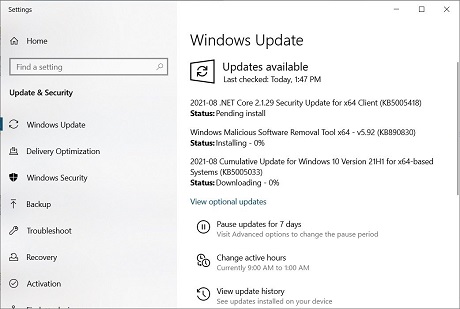
The full list of today's cumulative updates is below:
• Windows 10 version 1507 —
August 10, 2021—KB5005040 (OS Build 10240.19022)• Windows 10 version 1607 —
August 10, 2021—KB5005043 (OS Build 14393.4583)• Windows 10 version 1703 —
EOS• Windows 10 version 1709 —
EOS• Windows 10 version 1803 —
EOS• Windows 10 version 1809 —
August 10, 2021—KB5005030 (OS Build 17763.2114)• Windows 10 version 1903 —
EOS• Windows 10 version 1909 —
August 10, 2021—KB5005031 (OS Build 18363.1734)• Windows 10 version 2004, 20H2 and 21H1 —
August 10, 2021—KB5005033 (OS Builds 19041.1165, 19042.1165, and 19043.1165)If you own multiple PCs or if you would like to patch the PCs manually, you can learn more about how to do this
here.
Microsoft also fixed
44 security vulnerabilities in the August 2021 Patch Tuesday updates.
These updates include three fixes for zero-day vulnerabilities that were actively exploited or publicly disclosed, like PrintNightmare and PetitPotam.
What's new in the KB5005033 cumulative updateWith the KB5005033 update, Microsoft has released numerous security and non-security improvements. For example, Microsoft fixed an issue that prevents power plans and Game Mode from working as expected, resulting in lower frame rates and reduced performance while gaming.
Another bug has been fixed that causes the File Explorer window to lose focus when you are mapping a network drive.
After installing this update, Windows 10 2004 will be updated to build 19041.1165, Windows 10 20H2 will be updated to build 19042.1165, and Windows 10 21H1 will be updated to build 19043.1165.
This cumulative update comes with the following highlighted fixes:
• Changes the default privilege requirement for installing drivers when using Point and
Print. After installing this update, you must have administrative privileges to install
drivers. If you use Point and Print, see KB5005652, Point and Print Default Behavior
Change, and CVE-2021-34481 for more information.
• We fixed an issue that prevents gaming services from opening certain games for
desktop users.
• We fixed an issue that prevents you from entering text using the Input Method Editor
(IME). This might occur, for example, after startup if you have set the power options to
shut down a laptop by closing its lid.
• We fixed an issue with an MDM service that fails to correctly apply certain junk mail
rules.
• We fixed an issue that always reports the update build revision (UBR) as zero (0) on a
device during enrollment to an MDM service.
• We fixed an issue with auditing events 4624 and 5142 that display the wrong event
template when Dutch is the display language.
• We fixed an issue that causes System Integrity to leak memory.
• We fixed an issue that plays the sound for selecting something in a game loudly when
you press the trigger button on a game controller.
• We fixed an issue that prevents power plans and Game Mode from working as expected.
This results in lower frame rates and reduced performance while
• We fixed an issue that prevents you from accessing a network drive that maps to a
Distributed File System (DFS) root after you sign out.
Windows 10 version 1909 is getting KB5005031 with identical fixes.
source
