Author Topic: Android on your iPhone with Bootlace 2.1  (Read 1285 times)

Offline riso

  • Administrator
  • Hero Member
  • *****
  • Posts: 6413
  • Gender: Male
  • Beta tester Tech support dedicated 110%
    • windows 10 news and info | Forum - Blog
Android on your iPhone with Bootlace 2.1
« on: November 09, 2010, 06:30:54 PM »
Install Android 2.2 Froyo on your jailbroken iPhone 3G over-the-air with Bootlace. Yes, that headline is no mistake! You can indeed install the latest version of Froyo, Android 2.2.1, on a jailbroken iPhone 2 or 3G, and you can do it all without a computer. Redmond Pie has put together a nice step-by-step guide to getting Android on your iPhone with Bootlace 2.1, but in short: it's as simple as installing Bootlace 2.1 from Cydia, running it, and firing up iDroid. The rest is done for you, and frankly, it seems incredibly user friendly. Funny how the jailbreak community has made the process of installing Froyo on an iPhone easier than updating many Android phones.
Get your Android on by adding the repository "http://repo.neonkoala.co.uk'" to Cydia, and jump on over to Redmond Pie for their blow-by-blow guide.
Tags: android, android 2.2, Android2.2, bootlace, cydia, Froyo, iPhone, iPhone 3G, Iphone3g

Offline littlemax9

  • Hero Member
  • *****
  • Posts: 341
  • Gender: Male
Re: Android on your iPhone with Bootlace 2.1
« Reply #1 on: November 09, 2010, 07:55:34 PM »
Install Android on your iPhone Directly from your Device with BootLace

Remember iPhodroid which installs Android OS on your iPhone? Well, some hackers could make it even easier than before, you can now install Google's Android OS on your iPhone directly from your device without using computer thanks to the updated version of BootLace.

We have got full step by step guide and thanks to guys over iSpazio for spotting this shoots. Follow the steps below to install Android OS on your iPhone.

Supported devices:
iPhone 2G on iOS 3.1.2 or 3.1.3 jailbroken with Blackra1n, Redsn0w or PwnageTool.
iPhone 3G on iOS 4.x jailbroken with Redsn0w or PwnageTool.

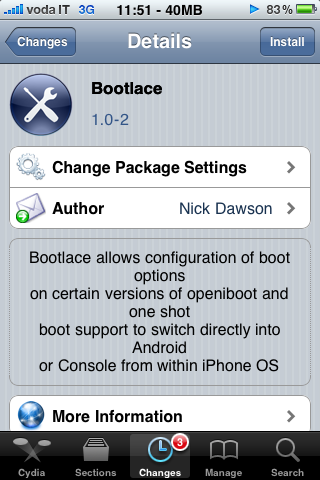
STEP 1: Once your device is jailbroken, tap on Cydia, touch Manage then choose Sources and add http://repo.neonkoala.co.uk. Now, search for BootLace and install it.


STEP 2: After installing the app, launch it, tap on OpeniBoot and hit the Install button as shown in the screenshot:
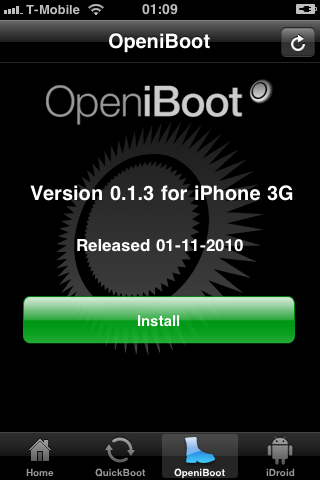


STEP 3: BootLace will check your compatibility and an automated process will take place to download and install some important files to install iBoot to run Android OS.

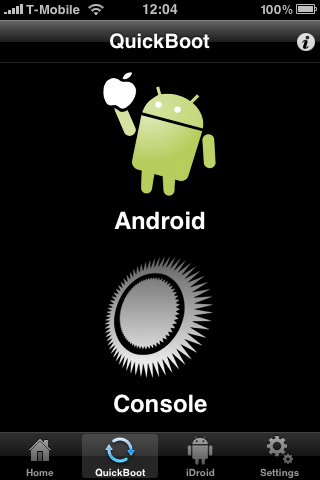
STEP 4: Now give your device a reboot, and you will be able to choose between iOS and Android OS through the QuickBoot tab.


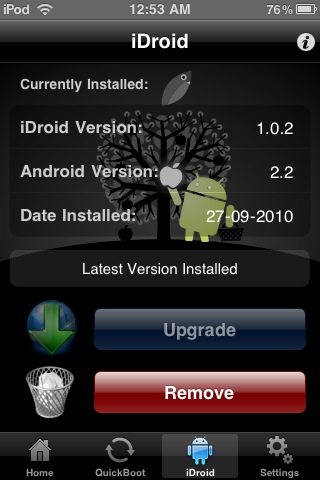
STEP 5: Although, through the iDroid tap, you can remove BootLace whenever you want and get back to the normal iOS.


By the way, you can watch a quick video guide below to watch it in action:
Bootlace Userland OpeniBoot Installation for iDroid
« Last Edit: November 09, 2010, 07:57:32 PM by littlemax9 »
“People liked NASCAR because the constant crashes made it exciting, and this gave me an idea...” - Bill Gates on Microsoft Windows