Microsoft has removed 119 extensions from the Edge add-on store which were all tied to one adware campaign.
In a paper titled “
Inside StegoAd: How We Disrupted a Massive Malicious Extension Campaign,” Microsoft researchers detail how they uncovered and dismantled a sophisticated malware campaign that abused browser extensions to infect users. According to Microsoft, the campaign involved 119 malicious browser extensions which were downloaded by 2.6 million users.
The extensions all promised, and delivered, some kind of basic functionality: ad blockers, VPNs, translators, video downloaders, calculators, coupon extensions and so on. But after a while they turned out to be “
sleepers” and secretly started downloading additional malware.
Among the payload was malware involved in
ad fraud, but also extensions that ran arbitrary JavaScript pushed from the server, which stole Google credentials and second-factor codes at sign-in, harvested WordPress admin logins, and exfiltrated cookies in bulk for session hijacking.
The name of the campaign “StegoAd” is derived from the words advertising and
steganography, which means techniques of hiding secrets in something that doesn’t immediately cause suspicion. In this case, hiding code in images.
And not only did the cybercriminals try to stay under the radar by waiting for some time, and hiding malicious code inside images, they also left some victims alone. Some of the extensions only went rogue in about 10% of installs, which would actually execute the next stage of the malware, while the other ~90% would be left alone (at least for that execution attempt). And, in some cases, they re-used names of well-known legitimate extensions to install an additional level of trust.
Browser extensions are a source of wealth for cybercriminals because it compares to installing a small program that lives inside your browser, which can see and report about everything you do on the internet.
Now I hear some of you thinking: I don’t use Edge. Or I’ve used it just once, to download and install my favorite browser. But although Microsoft discovered and analyzed the campaign, the techniques used in this campaign are applicable to Chromium-based browsers in general.
This campaign was less about exploiting a browser vulnerability and more about tricking users into installing a trusted-looking extension, then using sophisticated concealment techniques to avoid detection long enough to compromise systems.
How to stay safeAlways be careful when downloading extensions, even from the reputable app stores. As we’ve seen many times before, criminals manage to get their apps or extensions listed when they are only one update away from turning into malware. So, make sure that you trust the developer and don’t rely on reviews alone.
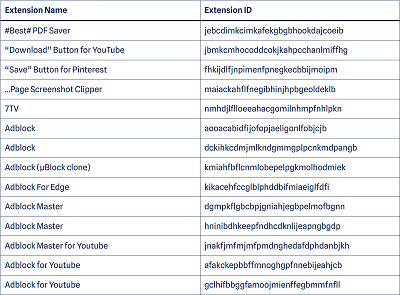
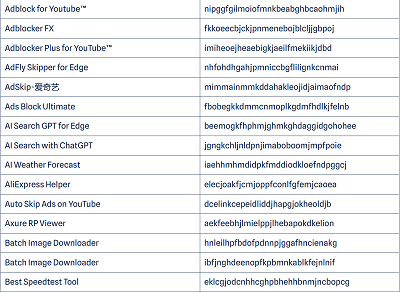
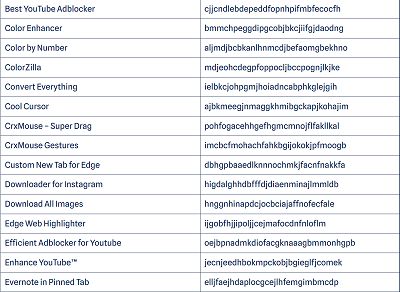
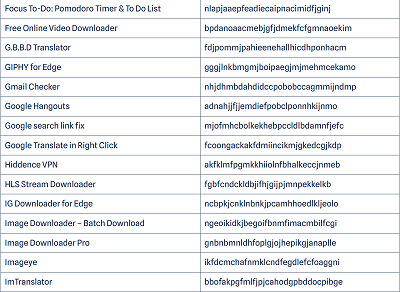
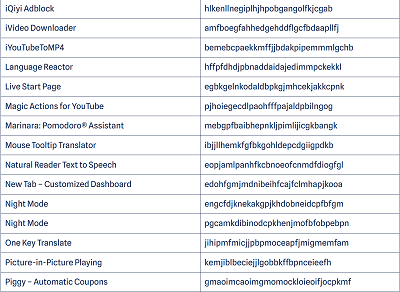
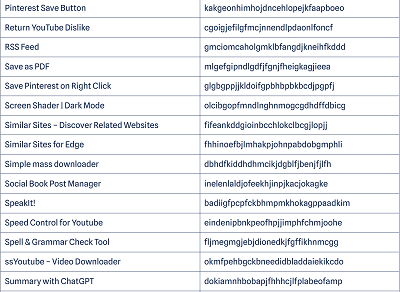
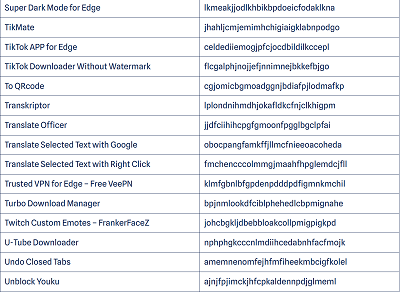
Use an up-to-date real-time security solution to detect and remove malicious extensions from your device and block connections to malicious domains and IP addresses. Remove the known malicious extensions from your browser. Below is an alphabetical list of the malicious extensions the researchers found by name.
Please note that there might be more than one extension that has the same name. In case you doubt whether the extension you have installed is among them, check whether the ID matches the one shown in the list. If you prefer looking them up by ID, you can find them organized differently in the
Microsoft report (pages 40-43).
 source
