 CES 2021 is filled with loads of uncertainties. How does the show replace the excitement of hands-on time with gadgets when everything is remote? Is there anything worth tuning in for? Will the heavy hitters of the tech industry show up? But one thing is for sure: 5G will be front and center at the trade show, which kicks off next week in a virtual format. Like last year, 5G will dominate the conversation. Verizon CEO Hans Vestberg is the first keynote speaker at CES, kicking things off Monday evening with a talk about the next-generation cellular technology. Capping off the show on Wednesday will be Samsung, which is expected to unveil its Galaxy S21 family -- 5G-enabled, of course -- in a separate event that isn't officially part of CES, but that will capture much of the same audience. In between, expect a lot of 5G. "Wherever you look across the [virtual] show floor, 5G will come up," Steve Koenig, vice president of research for the Consumer Technology Association, said in an interview with CNET senior reporter Shara Tibken. Ultimately, he said, "it will really touch everything we're doing." Also like last year, there won't be too many 5G phones beyond Samsung's offerings. CES has never been a mobile-centric show, with launches occurring later in the year. But the environment is radically different than in last year's show. For one thing, millions more people have a 5G device, thanks to a flood of phones that launched over the past 12 months, including Apple's iPhone 12 family and cheaper options like TCL's 10 5G UW for Verizon. Beyond phones, 5G-connected computers may make an appearance, according to Carolina Milanesi, an analyst at Creative Strategies. "It's mainstream from a product hype perspective," said Maribel Lopez, an analyst at Lopez Research. At a show where many of tech's heavy hitters, like Google, will have a minimal presence and showgoers won't have a chance to get their hands on products, discussions about the future of technologies like 5G hold more weight. Networks are far more mature as well, with all three major US carriers offering nationwide 5G coverage. Vestberg was last seen in November on stage with Apple CEO Tim Cook to tout his 5G network with the iPhone 12, and he's likely to press that momentum on the virtual stage at CES. Indeed, 5G could spark a shakeup among the carriers and their respective reputations for network quality, according to CNET editor Eli Blumenthal. While Verizon sports a short-range but super-fast network to augment its slower nationwide coverage, T-Mobile has been rolling out a network using a type of spectrum that offers a good mix of range and speed, potentially giving it the best 5G experience out of the big three. T-Mobile and AT&T have also both deployed that speedy, short-range network, called millimeter wave, but at a smaller scale than Verizon. AT&T and T-Mobile are largely sitting this CES out from a 5G front, giving Verizon the full stage. But that doesn't mean there won't be plenty of chatter about 5G at the show. CNET will hold a panel (quick plug: I'll be hosting it) on how 5G might be used to solve some of the issues exposed by the coronavirus pandemic, from closing the digital divide to making telemedicine more palatable and creating more engaging remote learning experiences. CES will feature nearly 20 sessions on the topic, exploring areas from 5G powering automation to aiding farming technology. Smart cities will also be on the agenda. Follow this and all events at this Virtual CES 2021 on OUR FORUM. 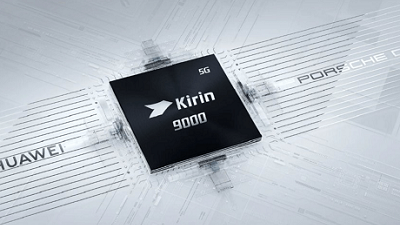 According to an industry leader, Huawei may be the first manufacturer to announce a 3nm chipset Is Huawei about to pull a special card from its sleeve in the battle for smartphone supremacy? According to an industry leader, its flagship processor is about to get a boost, according to a report in GizmoChina. Strangely enough, it has just been a few months since Huawei announced the Kirin 9000 processor. The chipset comes in two variants – the Kirin 9000 and Kirin 9000E – and is found only in the Mate 40 series smartphone, GizmoChina reported. Now, an industry leader has disclosed details about the next flagship Kirin processor which has been reported to be called the Kirin 9010. The info about the new Kirin processor comes from the leaker @RODENT950, and according to the tweet, the next-gen Kirin processor should arrive as the Kirin 9010 and it will be a 3nm chipset, GizmoChina reported. The Kirin 9000 launched as the first 5nm processor for Android devices and after its announcement came the Samsung Exynos 1080 and the Qualcomm Snapdragon 888. While most people will expect Huawei to stick to the 5nm process for at least two years, this leak reveals it is making the jump to 3nm for its next mobile chipset, which if all goes well, should launch this year and possibly appear in the Mate 50 series by Q4, GizmoChina reported. Speculation is that other chip manufacturers such as Qualcomm could follow suit and switch to 3nm for their next-gen flagship chipset if the news about Huawei’s 3nm chipset is true. The San Diego-based company is expected to announce a Snapdragon 888 Plus chipset later this year, which should be a 5nm processor like its sibling but with a higher clock speed, GizmoChina reported. Samsung, on the other hand, has been reported to be skipping the 4nm process and jumping to 3nm. Apple is also expected to announce 3nm processors that will be built by TSMC but it is not expected to arrive until 2022. So there is a chance Huawei may be the first manufacturer to announce a 3nm chipset. Chip processors are defined in nanometers (nm), in which the number defines the distance between transistors and other components within the CPU. The smaller the number, the more transistors that can be placed within the same area, allowing for faster, more efficient processor designs. Smaller transistors also consume less energy, which means lower power consumption. And because of lower power consumption, there’s lower heat dissipation, meaning cooler processors. It isn’t as easy as it sounds though – the process of shrinking these processes. Making smaller transistors requires very precise instruments and machines, which is why processors built on smaller processes will be costlier than older, larger ones. Moore’s Law, an old observation that the number of transistors on a chip doubles every year while the costs are halved, held for a long time but has been slowing down lately. Back in the late 90s and early 2000s, transistors shrunk in size by half every two years, leading to massive improvements on a regular schedule. But further shrinking has gotten more complicated. To get better informed visit OUR FORUM.  You can get a Microsoft Account for free, but that doesn't begin to describe its value, especially if you use that account for crucial email and cloud storage. Follow these seven steps to establish a solid baseline of security and protect that account from intruders. What's your most valuable online account, the one most deserving of protection? If you use a Microsoft account to sign in to a Windows PC, that account and its associated email address should be the one you guard most jealously. That's especially true if you use that Microsoft account for OneDrive storage and Office 365 documents. In this post, I list seven steps you can take to help you lock that account down so it's safe from online attacks. As always, there's a balancing act between convenience and security, so I've divided the steps into three groups, based on how tightly you want to lock down your Microsoft account. (It's worth noting that this article is about consumer Microsoft accounts used with Home and Personal editions of Office 365, Microsoft 365, and OneDrive. Security settings for business and enterprise Microsoft 365 accounts are managed by domain administrators through Azure Active Directory, using a completely different set of tools.) Baseline Security is sufficient for most ordinary PC users, especially those who don't use their Microsoft email address as a primary factor for signing in to other sites. If you're helping a friend or relative who's technically unsophisticated and intimidated by passwords, this is a good option. At a minimum, you should create a strong password for your Microsoft account, one that's not used by any other account. In addition, you should turn on two-step verification (Microsoft's term for multi-factor authentication) to protect yourself from phishing and other forms of password theft. When that feature is enabled, you have to supply additional proof of your identity when you sign in for the first time on a new device or when you perform a high-risk activity, such as paying for online purchase. The additional verification typically consists of a code sent as an SMS text message to a trusted device or in an email message to a registered alternate account. Baseline precautions are adequate, but you can tighten security significantly with a couple of extra steps. First, install the Microsoft Authenticator app on your iPhone or Android device and set it up for use as a sign-in and verification option. Then remove the option for using SMS text messages to verify your identity. With that configuration, you can still use your mobile phone as an authentication factor, but a would-be attacker won't be able to intercept text messages or spoof your phone number. The most extreme security, add at least one physical hardware key along with the Microsoft Authenticator app and, optionally, remove email addresses as a backup verification factor. That configuration places significant roadblocks in the way of even the most determined attacker. It requires an extra investment in hardware and it definitely adds some friction to the sign-in process, but it's by far the most effective way to secure your Microsoft account. You need a strong, unique password for your Microsoft account. The best way to ensure that you've nailed this requirement is to use your password manager's tools to generate a brand-new password. Generating a new password ensures that your account credentials are not shared with any other account; it also guarantees that an older password that you might have inadvertently reused isn't part of a password breach. The next step is to save a recovery code. If you're ever unable to sign in to your account because you've forgotten the password, having access to this code will save you from being permanently locked out. On the Microsoft Account Security Basics page, find the Advanced Security Options section and click Get Started. That takes you to the not-so-basic Microsoft Account Security page. Don't leave the Microsoft Account Security page just yet. Instead, scroll up to the Two-Step Verification section and make sure this option is turned on. The setup process is a fairly straightforward wizard that confirms you are able to receive verification messages. If you're using a modern smartphone with an up-to-date version of iOS or Android, you can safely ignore the prompts to create an app password for the mail client on those phones. Microsoft recommends that you have at least two forms of verification available in addition to your password. If you need to reset your password when two-step verification is enabled, you'll need to supply both of those forms of identification or you risk being permanently locked out. A free email address, such as a Gmail account, is acceptable if your security needs are minimal, but a business email address is a much better choice. If necessary, you can have a verification code sent to that address. More complete details can be found on OUR FORUM.
|
Latest Articles
|