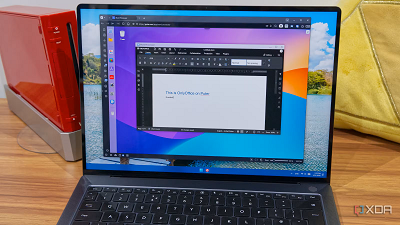
Operating systems are fairly complex pieces of software, and typically, they're the foundation of your computer experience. You don't usually expect to be able to run one operating system like Windows 11 inside another unless you get into virtual machines. But the idea of running an OS inside your browser still sounds like something of a dream.
Over the years, though, as technology has evolved, this has definitely become possible, and not only can you run classic operating systems in a web browser, but some newfangled solutions have popped up that could be considered their own operating system. So, if you feel like experimenting, here are a few options you can try out.
Windows 95 (and older)A trip back in timeIf you're around my age or older, you've most likely used Windows 95 at some point, and we all yearn for the "good" old days sometimes. It's not that I really miss Windows 95, but it's always nice to take a trip back and be reminded of what things were like in the mid-90s and how far we've come, for better or for worse.
Thanks to the PCjs website, run by Jeff Parsons, you can run Windows 95 right in your browser through a virtualized environment, offering a fully functional experience without any complicated setup. It's actually a bigger deal than you might think considering it can be pretty hard to set up properly working VMs for these old operating systems on modern PCs.
In fact, PCjs has even older versions of Windows if you feel like taking a trip to the past. Even Windows 1.0 is available to test, so you can see the humble beginnings of the world's most popular desktop operating system.
 ProzillaOSIt's... almost functional
Jumping back ahead to the modern day, ProzillaOS is more of a pseudo-operating system that can also run in your web browser. Realistically, you can't use this to do a whole lot, but it does give you a desktop environment and a handful of the apps you'd expect from an OS, including a file manager (where you can upload files from your own computer), a terminal, and some games. The terminal even supports some typical UNIX/Linux commands like neofetch for displaying system information.
Unfortunately, this isn't really a great experience. While you can upload some images to it, it doesn't seem to do so very reliably (especially for larger files), and the built-in web browser doesn't seem to load anything aside from a couple of default pages. Of course, it's not like you need a browser in the OS when you're already using the OS in a browser, but still. At least you do have a handful of games to play around with, and the whole thing looks and feels fairly modern.
 IBM OS/2Before Windows took over
Before Windows took over the computing world in the mid-to-late 90s, IBM was still one ofthe leading figures in the computing space, and in addition to making computers, it made the operating system for them. OS/2 was released in 1987 as an intended successor to PC DOS, and it was developed jointly by IBM and Microsoft, though Microsoft also released Windows 2.0 the same year.
Thankfully, the PCjs website has also preserved usable versions of OS/2 from 1.0 to 1.3. At least, I assume so — I actually can't get much done with OS/2, I must admit. You can launch the OS/2 or DOS terminal relatively easily, and the website UI lets you load different drives into the computer, which should let you run certain programs, and you can also load up your own files if you want. However, I'm not sure how to actually run them. If you're more familiar with the operating system, you may be able to get something done with it, but there isn't much of a GUI here to help you out.
exaequOSPractice developmentThere are certainly more web-based operating systems out there than I expected, and exaequOS is yet another one that's fairly interesting. It's based on UNIX and according to the develop, it can even run Wayland apps. A few apps are available out of the box, including the Nano text editor, a terminal-based version of the game 2048 (along with a few others), and more.
The goal of exaequOS is to help users understand the basics of development in UNIX systems, with support for languages such as C, C++, Lua, and more, with apps available to help you code in all these languages. You can even make WebAssembly apps. It's a fairly basic setup, but a very interesting one all the same, especially if you truly want to learn some basic principles of development.
 Mac OS (and OS X)Oh yes, it's possible
Rounding up the retro side of things, we have Mac OS X, which is available online thanks to the folks over at Infintite Mac. The website offers versions of Mac OS X all the way up to 10.4, though this one is labeled as unstable. Unfortunately, even version 10.3 seems kind of unusable with the provided virtual hardware. Mac OS X 10.1 is also available and fares a bit better, though I still wasn't able to connect to the internet and it slowed down quite a bit when doing anything.
It's frankly a better experience just using an older version, such as Mac OS 9.0. It looks a little older, but it runs more smoothly, and it even comes with some games and programs included out of the box. I was even to play the original DOOM on it, and running Doom on a virtual Mac inside a web browser is still kind of cool. There are a ton of Mac OS versions here, all the way back to the Apple System 1. It's a cool piece of history for those of us who have only ever known Windows as the big desktop platform.
 PuterA proper operating system in a browser
We've covered a few operating systems designed for the web so far, but Puter is really in a league of its own. This operating system is one of the most complete solutions you can find, and it truly offers a robust experience that works surprisingly well. The file manager feels very well design, and right-clicking it actually shows options as if it was a proper operating system, rather than just bring up your browser's context menu or something.
Puter has no reason to work as well as it does, yet it offers a very smooth experience with a ton of apps to play around with, and even an app store of sorts where you can find games and other tools. There's a full-blown word processor in the form of OnlyOffice, and on that note, you can also use its spreadsheet software or presentation maker. Puter also lets you sign in with an email address to save your work across sessions. And for games, there's a Fruit Ninja clone here that runs super smoothly, too.
My colleague Tanveer Singh has covered Puter before, and it's no wonder it was the focus of a sole article. This is a legitimately cool experience that serves as a great time-waster and a learning project alike. I highly recommend checking this out; I guarantee you'll spend more than a few minutes trying to see what it has to offer.
 It's amazing what's possible
Regardless of how you feel about a particular operating system on this list, it's just cool to see how much can be done directly within a web browser these days. Whether it's running a classic operating system to relive your childhood or creating a whole new web-based experience, people have put a lot of effort into creating full-fledged experiences that don't require a complicated setup. These aren't meant to replace an actual operating system, but they're still very cool.
Of course, through the magic of cloud PCs in solutions like Windows 365, you can use a full OS experience on the web, but this usually costs money, and not a small amount of it. These projects are still great for the average user.
source
